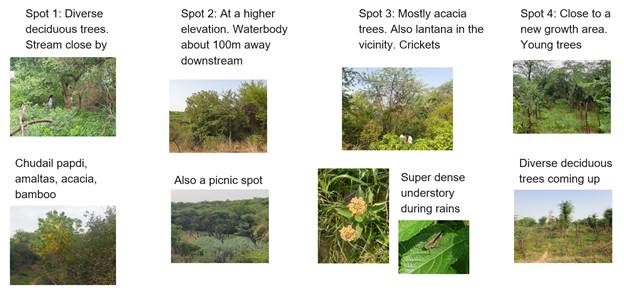
In earlier posts we wrote about finding sites for restoration, listening to them with bioacoustics recorders and mapping their trees from drone imagery. This post is about a map every one of those projects starts from: what covers the land, and where.
Why build your own land cover map?
National land cover maps sort India into a handful of fixed classes such as trees, crops, water and built-up. A field team almost always needs a class that isn’t on the list. A restoration team in Delhi’s Ridge wants native acacia apart from other trees. A team near a coalfield wants mining apart from bare ground. A watershed team wants seasonal ponds apart from permanent water.
Training a new classifier for each such question usually takes a remote sensing expert, thousands of labelled pixels and downloads of satellite imagery. We wanted a tool where the team that knows the ground can add the class it needs, with a few dozen example polygons, in an afternoon.
Do It Yourself LULC
Do It Yourself LULC is a web service on the CoRE stack. A user signs in with Google, draws an area anywhere in India and picks a year. The service paints a 10 m land cover map of the area with base classes, for instance: greenery, water, built-up and barren.
From there the user grows their own classes on top of the base map:
- Split a class into finer ones, such as greenery into acacia and non-acacia.
- Add a class the base map doesn’t have, such as mining inside barren.
- Merge classes from different models into one, such as tea and mining into an “extractive” class.
- Use a model from the zoo that someone else has already trained, and rename its classes to fit.
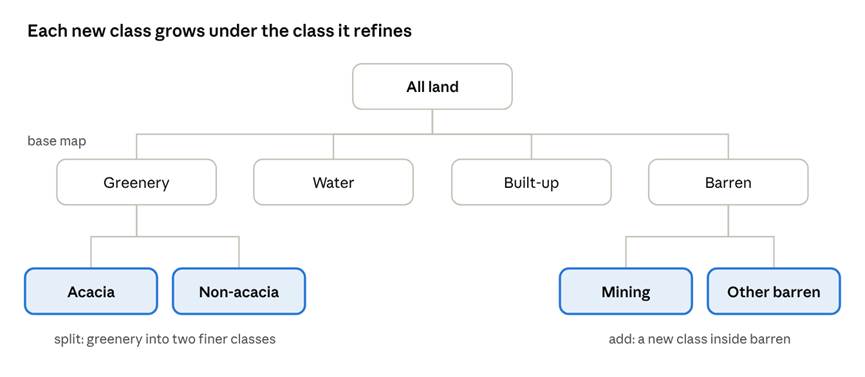
Figure 1: New classes grow under the class they refine.
Each change needs only example polygons of the new classes, drawn on the map or uploaded as a GeoJSON file. The service trains on them in a minute or two and shows how well the new classes are separated on polygons it held back.
How it works
The service never touches raw satellite images. It works on embeddings: Google’s Alpha Earth, which describes every 10 m pixel as 64 numbers for each year, and Tessera, which uses 128. A year of Sentinel-1 radar, Sentinel-2 optical and other sources is already summarised in those numbers, so pixels that look alike on the ground sit close together.
Alpha Earth is the default and runs entirely inside Earth Engine. Tessera can be picked instead for any split, which then trains on Tessera alone. Its tiles are downloaded to the CoRE stack server when needed, and the split is trained and drawn there.
- Base map. A linear classifier on the embeddings, trained on expert-labelled polygons from IndiaSAT, gives the four base classes.
- Your classes. Each split or added class gets its own small classifier, trained only on the pixels of the class it refines. A greenery split never has to tell water from buildings.
- The map. Because the classifiers are linear, they run as band arithmetic inside Google Earth Engine. A whole area is classified on Google’s servers and comes back as map tiles, with nothing downloaded. A Tessera split is classified on the CoRE stack server instead and drawn as a coarser grid.
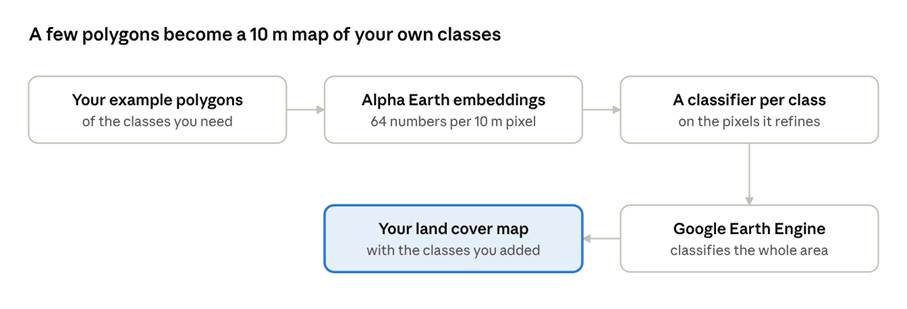
Figure 2: From example polygons to your own land cover map.
The embeddings are what make a few dozen polygons enough. The hard part, learning what land looks like across seasons and sensors, is already done; the user only has to show where their class sits among those numbers.
Two examples
Acacia in Sanjay Van
Our drone tree-crown service outlines every crown in a survey of Sanjay Van, and our team labelled each crown acacia or not. We uploaded 912 of those crowns (336 acacia, 576 other trees) as one GeoJSON file, which split greenery into acacia and non-acacia. On crowns held back from training, the new split is right 73% of the time, and finds 75% of the acacia.
The drone survey covers a few hectares. The satellite map extends the same distinction to the 17 km² box around it, where acacia is 14% of the area. One survey’s labels become a map of the whole forest.
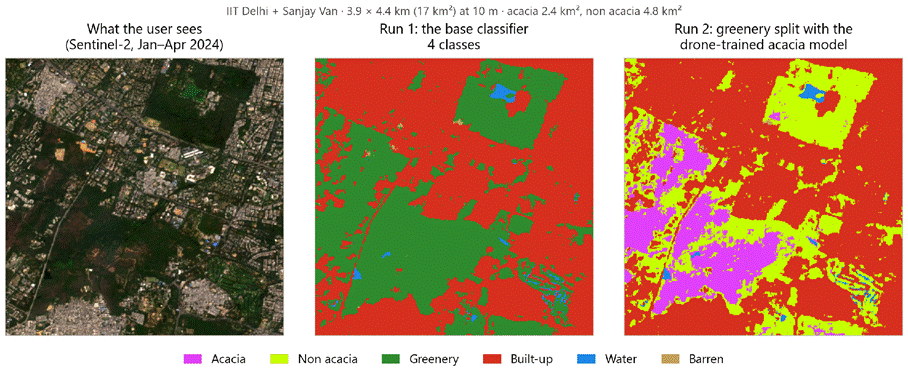
Figure 3: Sanjay Van and IIT Delhi, 2024. Left, the satellite view; middle, the four base classes; right, greenery split into acacia and non-acacia with the drone-trained model.
Mining around Jharia
The Jharia coalfield in Jharkhand has open-cast mines, villages and fallow land side by side, all of which a national map calls barren or built-up. A mining class added under barren, trained on known mine polygons, picks out the active pits. It flags 71% of the active coalfield at Jharia but only 17% of the reclaimed old mines at Asola in Delhi, so it sees active mining rather than bare rock.
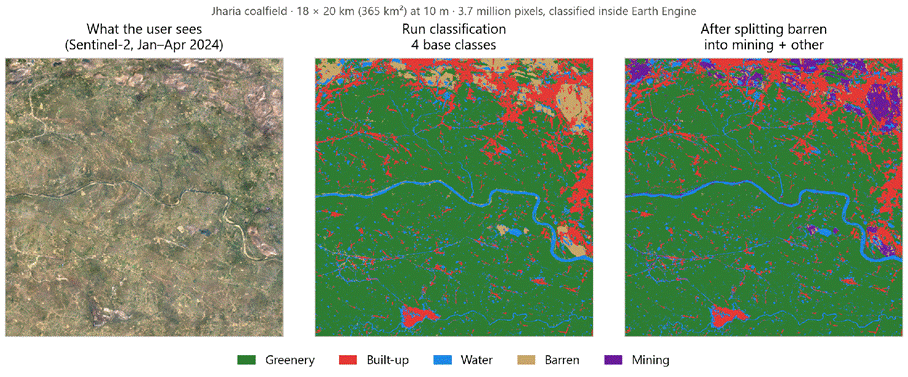
Figure 4: Jharia coalfield, 2024. Left, the satellite view; middle, the four base classes; right, barren split into mining and other barren. The rest of the map is unchanged.
Both are public sample projects: anyone can open them on the site, step through how each was built and copy one to start their own.
Getting a good split
Two choices matter more than the classifier itself.
- Label more than one year. Vegetation looks different from one year to the next. An acacia split trained on 2023 alone was right 64% of the time on years it never saw; trained on 2019, 2021 and 2023 together, it was right 75% of the time. The service lets a split train on several years at once.
- Spread the polygons out. A model trained on one corner of a district learns that corner. Our first base map, trained on polygons from 47 clustered patches, scored 94% on regions like its training data but 71% on new ones. Spreading the training polygons across India lifted it to 83% on regions it never saw.
What it can’t do yet
- It sees 10 m pixels. Single trees and ponds smaller than a few pixels fall below what it can tell apart. Acacia is mapped as stands, not as individual trees.
- Some classes stay hard. Acacia from other trees is right about three times in four, not every time, and the mining class marks mining pixels rather than outlining each mine.
- Tessera splits work on smaller areas, since every tile has to be downloaded first (about 140 MB per 11 by 11 km tile).
- GeoTIFF downloads are capped at 250 km²; larger areas can still be viewed and exported through Earth Engine.
- The maps have not been checked against field surveys beyond the labelled polygons we held back.
Projects, runs and the model zoo
Everything a user does lives in a project: one area, one year, the classes grown on it, the example polygons and the models trained for it. Pressing Run draws the map and keeps it as a run, with a frozen copy of the scheme that made it. Reopening a project shows its last map without running again, and a later change never alters an old run.
Each run can be downloaded as:
- a GeoTIFF of class codes at 10 m, for any GIS tool
- a STAC record of the inputs, models and settings, so the map can be catalogued and traced back
Every trained model gets a card in a shared model zoo: what classes it makes, what data trained it, its scores class by class and where it is strongest. A team mapping tea in Assam can find a tea model someone trained earlier, apply it to their own area and rename its classes, without labelling anything. A project can also be made public, so others can view its maps and copy it.
On the CoRE stack cluster
The service runs as one Docker container on the CoRE stack tower, next to the other Tower Services. Most of the compute happens in Google Earth Engine; Tessera splits are trained on the tower itself, and neither needs a GPU. When a user presses Run, the map is drawn at once and the tower’s Airflow pipeline, built on the STACD framework, exports the result as an Earth Engine asset with its STAC record. Sign-in is Google’s, checked on the server, and each user sees only their own projects and the public ones.
Try it
The service is deployed at www.cse.iitd.ernet.in/act4dws5/diy-lulc/. Its front page has a short walkthrough video of a full project, and the two sample projects open without signing in.
If you have feedback, find a bug, or have an area where you’d like to try this, write to us at contact@core-stack.org.